WTH are you doing with all this memory?$ top -b -n 1 | egrep "xulrunner|PID"say goodbye, you're going to die; mew
PID USER PR NI VIRT RES SHR S %CPU %MEM TIME+ COMMAND 3907 morph
20 0 2349m 859m 15m S 14 21.7 2013:33 xulrunner-stub
Matthew Palmer: Oh Firefox...
What are you doing in that the 1.1GB of resident memory (1357m of virtual memory) you have decided to consume in order to display three web pages? All fairly basic pages -- no flash, no excessive Javascript, and I haven't even done anything particularly exciting in the browser -- just loaded the pages up and let them sit for a few days.
Time to look at Conkeror on the Netbook, I suppose. I'm unlikely to be needing Firebug on there any time soon
Enrico Zini: Firefox garbage collection:
Some people complained about the insane memory usage of firefox.
It must be a misunderstanding. They probably are not aware of how to trigger the excellent garbage collector shipped with the browser.
Let's navigate heavily a bit, opening several new tabs, click click click around, then closing those tabs:
 $ top -b -n 1 | egrep "firefox|PID"   PID USER      PR  NI  VIRT  RES  SHR S %CPU %MEM
 TIME+  COMMAND  6842 enrico    20   0  882m 398m  17m S    2 19.9  24:29.55 firefox-bin
Indeed Firefox memory usage quickly grew. I've seen it grow to a gigabyte and a half after keeping it open for a month.
Now let's trigger the garbage collector:
 $ kill -9 6842 $ # Rerun firefox $ # Click on "Restore previous session"
$ # Wait for the various open tabs to reload
And voilà! Now Firefox uses much less memory than before:
 $ top -b -n 1 | egrep "firefox|PID"   PID USER
PR  NI  VIRT  RES  SHR S %CPU %MEM    TIME+  COMMAND  5242 enrico
  20   0  656m 205m  25m S    0 10.3   0:14.49 firefox-bin
Canonical, the founder of the Ubuntu project, today launched new professional services to help and support users building 'private clouds', cloud infrastructures behind a corporate firewall.
The move follows the technical preview in April of Ubuntu Enterprise Cloud (UEC), an open-source system that enables organisations to build their own clouds that match the interface of Amazon EC2. UEC is now available as part of the Ubuntu Server Edition technology stack.
By creating private clouds with UEC, organisations can optimise server use and increase data-centre efficiencies, while lowering costs and providing end users with self-service IT. Ubuntu is the first Linux distribution to provide such a system and now Ubuntu Enterprise Cloud Services from Canonical help businesses build these environments with optimal efficiency.
“Enterprises are realising that building 'private clouds' enables them to better manage variable workloads, while reducing the waste of idle servers. Building on open-source technology also avoids the issue of vendor lock-in,” said Mark Shuttleworth, CEO of Canonical. “Ubuntu Enterprise Cloud enables businesses to do this - and the addition of these services helps them to do it with confidence.”
Canonical has partnered with Eucalyptus, whose eponymous product forms the base of UEC, to jointly provide the service but with a single interface for the customer through the Canonical support team.
“While the IT industry talks of future strategies and releases vapour ware, UEC today allows businesses to deploy and now support a 'private cloud' on open source technologies from a renowned Linux provider,” said Woody Rollins, CEO of Eucalyptus. “We are very excited to lend our expertise to building the type of professional services that will help more businesses discover the benefits of private clouds built on open technologies.”
Pricing and Availability
Ubuntu Enterprise Cloud Services enable users to scale up from a five-machine environment all the way to a site license covering all machines, physical and virtual, in a single location.
Yearly pricing for entry-level support for five physical servers and up to 25 virtual Ubuntu servers is $4,750 for 9x5 standard support and $17,500 for 24x7 advanced support. Additional support packs are available per physical server and per ten virtual servers for $1,250 p.a. for standard support and $3,000 p.a. for advanced.
Site support is also available which covers one geographical location. It includes an unlimited number of physical and virtual servers for $90,000 p.a. for standard support and $150,000 p.a. for advanced.
To use Ubuntu Enterprise Cloud, users must first install Ubuntu 9.04 Server Edition available at no charge from http://www.ubuntu.com/getubuntu/download-server
To find out more about Ubuntu Cloud Computing, please visit http://www.ubuntu.com/cloud
To enquire about support, please visit: http://www.canonical.com/contact/cloud
more information on Cloud Service:
http://www.ubuntu.com/products/whatisubuntu/serveredition/cloud/services
To keep up-to-date with Ubuntu Cloud activity, follow the cloud blog aggregator: http://cloud.ubuntu.com
Follow Ubuntu cloud on Twitter: http://twitter.com/ubuntucloud
The past few Linux kernel releases have brought a number of new file-systems to the Linux world, such as with EXT4 having been stabilized in the Linux 2.6.28 kernel, Btrfs being merged into Linux 2.6.29, and most recently the NILFS2 file-system premiering with the Linux 2.6.30 kernel. Other file-systems have been introduced too during the past few Linux kernel release cycles, but these three have been the most talked about and are often looked at as being the next-generation Linux file-systems. Being the benchmarking junkies that we are, we have set out to compare the file-system performance of EXT4, Btrfs, and NILFS2 under Ubuntu using the Linux 2.6.30 kernel. We also looked at how these file-systems compared to EXT3 and XFS.
Before we begin, here is a quick summary of these three new file-systems. EXT4 is the successor to EXT3 and this file-system can now support volumes up to 1 Exabyte, introduces Extents to replace traditional block mapping, supports persistent pre-allocation and delayed allocation for improving performance, brings journal check-summing to the EXT family, and file-system checking is faster under EXT4. Previously we delivered real-world benchmarks of EXT4and found it to be a nice performance step above EXT3 in a majority of the tests. Install-time support for EXT4 was introduced with Ubuntu 9.04. EXT3 has been in the Linux kernel since 2001 and is what a majority of the Linux desktop distributions had been using as the default file-system.
Labels: benchmark, filesystem, kernel, linux
Canonical today announced that it has been collaborating with SanDisk, the global leader in flash memory cards, to improve how Ubuntu runs on the solid state drives (SSDs) that provide the memory – and memory management – for most netbooks and laptops in the market today. Engineers from both companies have worked closely on system optimizations resulting in longer battery life, reduction in heat levels & better system responsiveness. This is done to optimise the user experience and offer original equipment manufacturers (OEMs) a better solution to bring to market.
In addition to remote collaboration, SanDisk engineers have engaged at events like the Ubuntu Developer Summit in San Francisco and Barcelona where the technology industry and Ubuntu community plan future releases of the award-winning platform.
That an industry leader like SanDisk has engaged to this degree is testament to the success of Ubuntu in winning design wins with leading PC manufacturers. More and more people are choosing an open platform on which to run their 'on-the-go' netbook machines, while increasing numbers of OEMs are enjoying the freedom and product differentiation that choosing Ubuntu gives them. With SanDisk committed to full support for the Ubuntu platform, and its engineers in direct and regular contact with their operating system peers, the success of Linux shows signs of acceleration in this area.
"SanDisk is committed to providing OEMs and consumers more choices in how they compute,” said Rich Heye, senior vice president and general manager, Solid State Drives, SanDisk. “We decided to collaborate with Canonical thanks to its unprecedented success in helping Ubuntu to drive Linux in the mainstream market. Ubuntu on SanDisk SSDs delivers a fast, robust user experience and offers a fantastic combination for OEMs or original design manufacturers (ODMs)."
"There is no question that flash memory technology has helped this category to flourish. For small, lightweight, robust, heat-managed machines, SanDisk SSD is the best choice for OEMs," said Chris Kenyon, Director of OEM Services at Canonical. "The collaboration between our two organisations demonstrates that Ubuntu is an easy and great choice for OEMs interested in delivering an optimal user experience while differentiating their machines in the market."
Alpha 4 is the fourth in a series of milestone CD images that will be released throughout the Hardy development cycle. The Alpha images are known to be reasonably free of showstopper CD build or installer bugs, while representing a very recent snapshot of Hardy. You can download it here:
http://cdimage.ubuntu.com/releases/hardy/alpha-4/ (Ubuntu)
http://cdimage.ubuntu.com/kubuntu/releases/hardy/alpha-4/ (Kubuntu)
http://cdimage.ubuntu.com/edubuntu/releases/hardy/alpha-4/ (Edubuntu)
http://cdimage.ubuntu.com/jeos/releases/hardy/alpha-4/ (Ubuntu JeOS)
http://cdimage.ubuntu.com/gobuntu/releases/hardy/alpha-4/ (Gobuntu)
http://cdimage.ubuntu.com/ubuntustudio/releases/hardy/alpha-4/ (UbuntuStudio)
See http://wiki.ubuntu.com/Mirrors for a list of mirrors.
Alpha 4 includes several new features that are ready for large-scale testing. Please refer to http://www.ubuntu.com/testing/hardy/alpha4 for information on changes in Ubuntu and https://wiki.kubuntu.org/HardyHeron/Alpha4/Kubuntu for changes in Kubuntu.
This is quite an early set of images, so you should expect some bugs. For a list of known bugs (that you don’t need to report if you encounter), please see: http://www.ubuntu.com/testing/hardy/alpha4
If you’re interested in following the changes as we further develop Hardy, have a look at the hardy-changes mailing list:
http://lists.ubuntu.com/mailman/listinfo/hardy-changes
We also suggest that you subscribe to the ubuntu-devel-announce list if you’re interested in following Ubuntu development. This is a low-traffic list (a few posts a week) carrying announcements of approved specifications, policy changes, alpha releases, and other interesting events.
http://lists.ubuntu.com/mailman/listinfo/ubuntu-devel-announce
Bug reports should go to the Ubuntu bug tracker:
https://bugs.launchpad.net/ubuntu
Related Posts:
Ubuntu Hardy Heron Alpha 3 released
Ubuntu Hardy Heron Alpha 2 released
Ubuntu Hardy Heron Alpha 1 released
Ubuntu 7.10 Released

Wal-Mart sells this Everex gPC for $198. It's bundled with speakers, a mouse, and a keyboard, and it comes with 24-hour tech support. The operating system is called gOS, a version of Ubuntu 7.10. Despite the fact that many mainstream consumers have likely never even heard of Ubuntu, Wal-Mart is having trouble keeping the gPC in stock.

Mirus and Linspire collaborated on the Mirus Linux PC, which is now for sale at Sears.com. Its retail price is $299, but an included $100 rebate brings it to $199. It comes preloaded with Freespire 2.0, an Ubuntu-based Linux distribution.
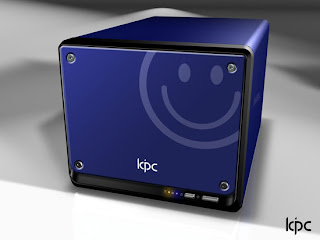
At the Consumer Electronics Show earlier this month, Shuttle introduced its KPC. It'll include an Intel Celeron processor, a 945GC chipset, 512MB of memory, and either a 60GB or 80GB hard drive. What it won't have: an optical drive or a PCI Express slot. It comes in red, blue, white, and black, each with a different icon stamped on the front. Shuttle also says there will also be a $99 bare-bones version of the KPC. That version will have the option of upgrading to a Core 2 Duo processor and 1GB of memory.
source:DISCOVIX
Starting up
I have been following the development of KDE4 for quite a few months now. The version I base this post on is from the main KDE development (trunk in svn) at the time of the release tagging freeze. As such it should be very similar to the packages you will receive from your favorite distribution on the 11th.

Progress all around
Many of the new frameworks are still almost unused in the user interface of the first KDE4 release. But some more obvious and easily implementable changes have already appeared in KDE4.0.0.
Graphics
Oxygen: Originally planned as the new icon set for KDE4, Oxygen has re-defined all aspects of KDE's user interface, including the window decorations and theme.
Plasma: Plasma is the new desktop shell of KDE4, one of the most anticipated components of KDE4 and the one which was started last.
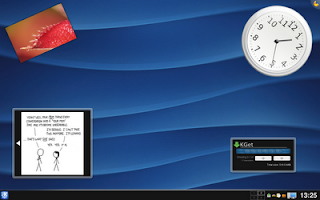
Because of its late start plasma has not realized its full potential yet, but as with many things in KDE4.0.0 it will gain features rapidly in the future. Plasma's vision is a lot more than to display a panel and cool looking widgets. Stay tuned, already KDE4.1 will introduce new features.
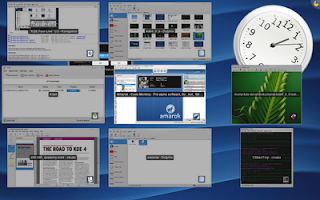
KWin: KWin has been a very robust window manager for a long time. New in KDE4 is its ability to use desktop effects, window shadows and subtle animations. These features depend on the availability of OpenGL or at least XRender, which are not fully supported on all graphics cards yet although the situation is improving rapidly.
Applications
Dolphin: The new default file manager in KDE4. While Konqueror has retained its ability to manage files (and cook coffee) dolphin is written specifically for this task.

The first visible piece of KDE4's new semantic search backend Nepomuk (the name won't be visible in the UI) is dolphin's ability to annotate and rate files.
In the future Nepomuk and Strigi will help you answer questions like "Who gave me this file?" or "What sources did I use on that KDE4.0.0 blog post?"
Progress in Qt4 (the toolkit KDE4 is based on) allows user interface polish like dolphin's sidebar, which changes its layout dynamically as the user drags it. No screenshot, you have to see this one in action.
Gwenview: KDE's image viewer Gwenview has received a lot of polish while it was ported to KDE4 and handles really, really well.
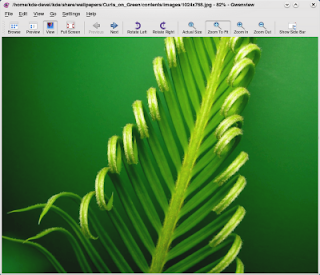
Okular: The new document viewer for KDE4, based on KDE3's KPDF application. It sports annotation features, previews, presentation mode, bookmarks and support for no less than 28 file types in my build.

Unreleased Applications
Amarok: The famous KDE based audio player has been ported to KDE4 and is receiving a major overhaul. It is currently in pre-alpha state, but I have been able to use it normally over the last few weeks. When it is ready, it may also be released for windows.

Dragon Player: Based on the Codein video player from the KDE3 days, Dragon Player continues a successful carrier as a simple and enjoybale video player.

These are some of the highlights of the upcoming KDE4.0.0. I hope you enjoyed this preview and have come to share my opinion that KDE4 is going to rock!
Take a look at this album for these and a few more screenshots I didn't include in this post.
source:drowstar.blogspot.com
| |||||||||||||||||||||||||||||||||||||||||||||||||||||||||||||||||||||||||||||||||||||||||||||||||||||||||||||||||||||||||||||||||||||||||||||||||||||||||||||||||||||||||||||||||||||||||||||||||||||||||||||||||||||||||||||||||||||||||||||||||||||||||||||||||||||||||||||||||||||||||||||||||||||||||||||||||||||||||||||||||||||||||||||||||||||||||||||||||||||||||||||||||||||||||||||||||||||||||||||||||||||||||||||||||||||||||||||||||||||||||||||||||||||||||||||||||||||||||||||||||||||||||||||||||||||||||||||||||||||||||||||||||||||||||||||||||||||||||||||||||||||||||||||||||||||||||||||||||||||||||||||||||||||||||||||||||||||||||||||||||||||||||||||||||||||||||||||||||||||||||||||||||||||||||||||||||||||||||||||||||||||||||||
Sure, konqueror and midori (which uses GTK webkit) already provide a pretty good approximation on Safari rendering, but there might still be differences.
Here's how to run Safari on Linux:
- run winecfg, set Windows version to WinXP.
- copy the core windows fonts:
cp /usr/share/fonts/truetype/msttcorefonts/{Arial,Times_New_Roman}*.ttf ~/.wine/drive_c/windows/fonts/ - Download Safari for Windows from the Apple homepage
- Run the Safari installer with Wine. Do not install Bonjour or the Apple updater.
- Run Safari
The biggest 'trick' for me was to install the Microsoft fonts. Without them, Safari would segfault when rendering the URL bar the first time.
Step 2 assumes you have the Microsoft fonts already installed on your system in the place typical for Debian and Ubuntu users. If you don't find out how to get the required ttf files yourself. You maybe also can just symlink them.
Wine can indeed run most Windows applications by now...
Related Articles:
ies4linux claims to have a way of installing and running MS IE 7 on Linux.
source:blog.drinsama.de/erich


I’ve always been annoyed by the discussions about “is Ubuntu really giving back to Debian?”. Debian Developers usually don’t see a lot of “giving back”, and Ubuntu Developers complain about Debian Developers ignoring their bug reports and patches.
So, a few months ago, I proposed that Ubuntu developers use a usertag when they report bugs to the Debian BTS, so they can be tracked.
Results are available:
- Bugs with the origin-ubuntuusertag (bugs reported by Ubuntu Developers, with their Ubuntu hat on)
- Bugs with the ubuntu-patchusertag (as above, but a solution is provided by the Ubuntu developer)
Comments:
- It’s really good to see Ubuntu developers reporting bugs and contributing patches to Debian!
- … But more bugs (and patches) would be better, of course. Let’s continue the good work!
- Many patches are applied very fast in Debian (as usual), but in some cases, the patches are ignored (as usual, too). It would be great if Debian Developers could treat those bugs as higher priority, since it makes life easier on the Ubuntu side (less difference means less work)
source:lucas-nussbaum.net
Makers of Linux platforms are improving their desktop OSs too. One company making huge leaps forward is Canonical, the company behind Ubuntu. In April 2007, Canonical released Ubuntu 7.04, code-named Feisty Fawn. Prior to the release of 7.04, I'd tested Ubuntu and found it somewhat acceptable for my needs but not exceptionally great mainly because it didn't recognize some of my particular hardware and I didn't want to spend much time finding and installing drivers.
In early June 2007, I finally got around to giving Ubuntu another look (using a bootable Live CD) and was pleasantly surprised. The new OS recognized all my hardware immediately, including my printers, wired Ethernet cards, and half a dozen different Wi-Fi cards. I then poked around the desktop a little bit and discovered that almost all the tools I need for day-to-day work are either already installed by default or are available for easy Internet-based installation with a few clicks of the mouse. It was at that point that Ubuntu really got my attention. I found myself thinking that I could quickly install Ubuntu along with all the tools I need and take the OS for an extended long-term test drive.And that's exactly what I did.
When I began the test drive, the questions I had in mind were, "Can I use this OS as my everyday desktop?" and "Can it effectively replace my Windows desktop?" As it turns out, the answers are yes and no, respectively. After using Ubuntu as my primary desktop for 7 months straight, every day of the week, I am thoroughly impressed. I've found that it's a fantastic platform for regular users. However, there are obvious problems for Windows security administrators.
Administrators need to run all sorts of third-party Windows-based security tools as well as the security-related tools built into Windows itself. I solved those problems in two ways, both of which might be obvious to at least some of you. The first solution is to use Wine (a Windows emulation environment), which is installed in Ubuntu by default. Wine let me run numerous third-party Windows tools directly on the Ubuntu desktop. The second solution is that I installed a free virtual machine (VM) platform and then installed Windows Vista as a guest VM. So when I need to use a tool that won't run properly under Wine or a tool that's built into Windows, I start the Vista VM and use the tool in that environment; when I'm done, I shut down the VM.
I've found that Ubuntu is reasonably secure, has decent desktop controls that help prevent unwanted access (similar to Vista's User Access Control--UAC), and is relatively quickly patched when security problems appear in various OS components. Installing those patches is easy too--a bit easier than typical desktop updates on Windows platforms.
So for the past 7 months, I've been enjoying the best of both the Linux and Windows worlds. My extended test drive of Ubuntu has been extremely fun and a great learning experience, particularly in terms of interoperability.
I wouldn't go so far as to say that any Windows administrator can switch to Ubuntu (or any other Linux desktop platform), but I do think that it's a great platform for everyday use by nonadministrative users and for those administrators that simply need a Linux platform to get their job done in the best possible manner.
Article written By Mark Joseph Edwards
source:windows-center.blogspot.com
Remote: Yes
Date Published: 2007-12-18
Relevant URL: http://www.securityfocus.com/bid/26927
Summary:
ClamAV is prone to an integer-overflow vulnerability because it fails to properly verify user-supplied data.
Successful exploits of this vulnerability can allow remote attackers to execute arbitrary machine code in the context of applications using the 'libclamav' library. Failed exploits may crash the application.
ClamAV 0.91.2 is vulnerable to this issue; other versions may also be affected.
2. Retired: Adobe Flash Player Multiple Security Vulnerabilities
Remote: Yes
Date Published: 2007-12-18
Relevant URL: http://www.securityfocus.com/bid/26929
Summary:
Adobe Flash Player is prone to multiple security vulnerabilities.
The following individual records have been created to document these vulnerabilities:
Adobe Flash Player ActiveX Control 'navigateToURL' API Cross Domain Scripting Vulnerability
Adobe Flash Player JPG Header Remote Heap Based Buffer Overflow Vulnerability
Adobe Flash Player 'asfunction' Cross Site Scripting Vulnerability
Adobe Flash Player Unspecified Privilege-Escalation Vulnerability
Adobe Flash Player HTTP Response Splitting Vulnerability
Adobe Flash Player Policy File Cross Domain Security Bypass Vulnerability
These issues affect Adobe Flash Player 9.0.48.0, 8.0.35.0, 7.0.70.0 and prior versions.
3. Adobe Flash Player DNS Rebinding Vulnerability
Remote: Yes
Date Published: 2007-12-18
Relevant URL: http://www.securityfocus.com/bid/26930
Summary:
Adobe Flash Player is prone to a DNS rebinding vulnerability that allows remote attackers to establish arbitrary TCP sessions.
An attacker can exploit this issue by enticing an unsuspecting victim to view a malicious SWF file.
Successfully exploiting this issue allows the attacker to bypass the application's same-origin policy and set up connections to services on arbitrary computers. This may lead to other attacks.
4. libexif Image Tag Remote Integer Overflow Vulnerability
Remote: Yes
Date Published: 2007-12-19
Relevant URL: http://www.securityfocus.com/bid/26942
Summary:
The libexif library is prone to an integer-overflow vulnerability because the software fails to ensure that integer values are not overrun.
Successful exploits of this vulnerability allow remote attackers to execute arbitrary machine code in the context of an application using the vulnerable library. Failed attempts will likely result in denial-of-service conditions.
5. Linux Kernel IPv6 Hop-By-Hop Header Remote Denial of Service Vulnerability
Remote: Yes
Date Published: 2007-12-19
Relevant URL: http://www.securityfocus.com/bid/26943
Summary:
The Linux kernel is prone to a remote denial-of-service vulnerability because it fails to adequately validate specially crafted IPv6 'Hop-By-Hop' headers.
Attackers can exploit this issue to cause a kernel panic, denying service to legitimate users.
6. ClamAV 'mspack.c' Off-By-One Buffer Overflow Vulnerability
Remote: Yes
Date Published: 2007-12-19
Relevant URL: http://www.securityfocus.com/bid/26946
Summary:
ClamAV is prone to a buffer-overflow vulnerability because it fails to properly bounds-check user-supplied input before copying it to insufficiently sized memory buffers.
Successful exploits of this vulnerability can allow remote attackers to execute arbitrary machine code in the context of applications using the 'libclamav' library. Failed exploits may crash the application.
ClamAV 0.91.2 is vulnerable to this issue; other versions may also be affected.
7. Adobe Flash Player 'asfunction' Cross Site Scripting Vulnerability
Remote: Yes
Date Published: 2007-12-18
Relevant URL: http://www.securityfocus.com/bid/26949
Summary:
Adobe Flash Player is prone to a cross-site scripting vulnerability because the application fails to properly sanitize user-supplied input.
An attacker may leverage this issue to execute arbitrary script code in the browser of an unsuspecting user in the context of the affected site. This may help the attacker steal cookie-based authentication credentials and launch other attacks.
8. Adobe Flash Player JPG Header Remote Heap Based Buffer Overflow Vulnerability
Remote: Yes
Date Published: 2007-12-19
Relevant URL: http://www.securityfocus.com/bid/26951
Summary:
Adobe Flash Player is prone to a remote heap-based buffer-overflow vulnerability because the application fails to use consistent signedness when handling user-supplied input.
An attacker can exploit this issue to execute arbitrary code with the privileges of a user running the application. Failed exploit attempts will likely cause denial-of-service conditions.
This issue affects Adobe Flash Player 9.0.48.0, 8.0.35.0, 7.0.70.0, and prior versions.
9. Adobe Flash Player ActiveX Control 'navigateToURL' API Cross Domain Scripting Vulnerability
Remote: Yes
Date Published: 2007-12-18
Relevant URL: http://www.securityfocus.com/bid/26960
Summary:
The Adobe Flash Player ActiveX control is prone to a cross-domain scripting vulnerability.
An attacker may leverage this issue to execute arbitrary JavaScript in the context of another domain.
This issue affects Adobe Flash Player 9.0.48.0, 8.0.35.0, and prior versions.
10. Adobe Flash Player Unspecified Privilege-Escalation Vulnerability
Remote: Yes
Date Published: 2007-12-18
Relevant URL: http://www.securityfocus.com/bid/26965
Summary:
Adobe Flash Player is prone to a vulnerability that allows attackers to gain elevated privileges on affected computers.
Very few technical details are currently available. We will update this BID as more information emerges.
NOTE: This issue occurs only when the application is running on a Linux operating system.
Versions prior to Adobe Flash Player 9.0.115.0 are vulnerable.
11. Adobe Flash Player Policy File Cross Domain Security Bypass Vulnerability
Remote: Yes
Date Published: 2007-12-18
Relevant URL: http://www.securityfocus.com/bid/26966
Summary:
The Adobe Flash Player is prone to a cross-domain security-bypass vulnerability.
An attacker can exploit this issue to connect to arbitrary hosts on affected computers. This may allow the application to perform generic TCP requests to determine what services are running on the affected computer.
This issue affects Adobe Flash Player 9.0.48.0, 8.0.35.0. 7.0.70.0, and prior versions.
12. Adobe Flash Player HTTP Response Splitting Vulnerability
Remote: Yes
Date Published: 2007-12-20
Relevant URL: http://www.securityfocus.com/bid/26969
Summary:
Adobe Flash Player is prone to an HTTP response-splitting vulnerability because it fails to adequately sanitize user-supplied input.
A remote attacker can exploit this vulnerability to influence or misrepresent how web content is served, cached, or interpreted. This could aid in various attacks that try to entice client users into a false sense of trust.
This issue affects Adobe Flash Player 9.0.48.0, 8.0.35.0, and 7.0.70.0 and prior versions.
13. libexif Image Tag Remote Denial Of Service Vulnerability
Remote: Yes
Date Published: 2007-12-19
Relevant URL: http://www.securityfocus.com/bid/26976
Summary:
The libexif library is prone to a denial-of-service vulnerability because of an infinite-recursion error.
Exploiting this issue allows remote attackers to cause denial-of-service conditions in the context of an application using the vulnerable library.
14. Bitflu StorageFarabDb Module '.torrent' File Handling Security Bypass Vulnerability
Remote: Yes
Date Published: 2007-12-26
Relevant URL: http://www.securityfocus.com/bid/27043
Summary:
Bitflu is prone to a security-bypass vulnerability.
An attacker can exploit this issue to append to or create arbitrary files.
This issue affects versions of Bitflu prior to 0.42.
15. Bitflu StorageFarabDb Module '.torrent' File Handling Security Bypass Vulnerability
Remote: Yes
Date Published: 2007-12-26
Relevant URL: http://www.securityfocus.com/bid/27043
Summary:
Bitflu is prone to a security-bypass vulnerability.
An attacker can exploit this issue to append to or create arbitrary files.
This issue affects versions of Bitflu prior to 0.42.
16. ClamAV BZ_GET_FAST Bzip2 Decompression Vulnerability
Remote: Yes
Date Published: 2007-12-29
Relevant URL: http://www.securityfocus.com/bid/27063
Summary:
ClamAV is prone to a vulnerability due to a flaw in its Bzip2 decompression support.
Successful exploits of this vulnerability may potentially allow remote attackers to execute arbitrary code in the context of the vulnerable application or to trigger denial-of-service conditions. These affects have not been confirmed.
Further information is not currently available; this BID will be updated as more information is disclosed.
ClamAV 0.91.2 is vulnerable to this issue; other versions may also be affected.
Labels: linux, vulnerability


NYT Technology: How to Fight Health ‘Cures’ Online
NASA Image of the Day: Perseverance Rover Mated to...
NYT Technology: Massachusetts Sues Uber and Lyft O...
U.S. crude oil and natural gas production in April...
Air Force says service still needs to be bigger - ...
Facebook reportedly considers ban on political ads...
1 BTC equals 9310.0801 USD
NYT Technology: YouTube’s Factory Workers Are Angry
NASA Image of the Day: Hubble Sees a Star Called H...
April 2006
May 2006
June 2006
July 2006
August 2006
September 2006
October 2006
November 2006
December 2006
February 2007
April 2007
May 2007
June 2007
July 2007
August 2007
September 2007
October 2007
November 2007
December 2007
January 2008
February 2008
April 2008
May 2008
July 2008
August 2008
September 2008
October 2008
November 2008
January 2009
May 2009
June 2009
July 2009
August 2009
September 2009
December 2009
March 2010
June 2010
July 2010
September 2010
October 2010
November 2010
January 2011
March 2011
February 2013
April 2013
September 2013
December 2013
August 2014
September 2014
October 2014
November 2014
January 2015
January 2016
September 2018
October 2018
November 2018
December 2018
January 2019
February 2019
March 2019
April 2019
May 2019
June 2019
July 2019
August 2019
September 2019
October 2019
November 2019
December 2019
January 2020
February 2020
March 2020
April 2020
May 2020
June 2020
July 2020